Set DNS type A record

DNS has different types of record types that can be set to refer to the hosting server, connect URL with IP, add acme record as TXT for SSL certificates and many more.

In order to set the record go to profile and locate the Control Panel setting, control panel has the IP of the server where the domain is hosted. Copy the IP address.
IP (Internet Protocol) is a number in 4 parts, each separated by a decimal or period.
Kind of 255.290.09.01 …

Now from header menu on cloudhosting9.com, navigate to “Configuration” and then to “Domain”
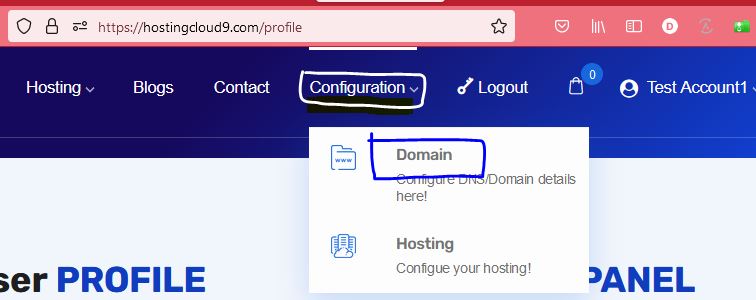
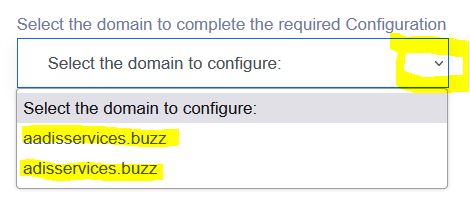
On the domain selection page, select your domain to act upon.
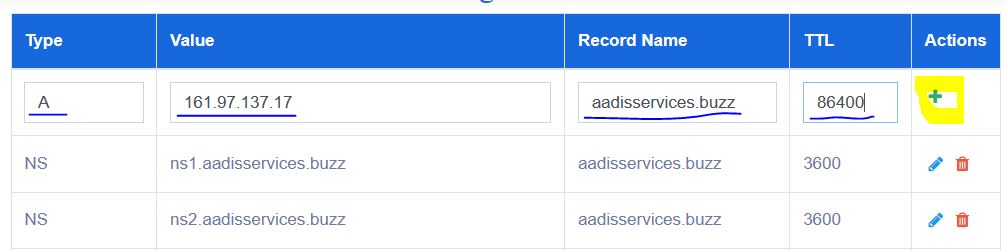
On selection of domain name this opens a page with all the DNS parameters, here we can go ahead and set the A record.

Add all the details as asked on the page, for example see the details in the attached image.
Once all the value provided click on the ‘+’ button to add the record.
This will add the record and refresh the page with new details.
Generally this takes few minutes to 24 hrs to set the records, but after 15 minutes of success response the url can be checked in the browser.
If url does not come up in 24 hrs, please connect with us through contact us page or chat.

This completes setting of record type A for the DNS to link the URL and the server IP. Similarly other DNS entry can also be applied when needed.

Setting TXT records for SSL certificate is same as above only values differ.

set DNS record
Check DNS Record

Note: Type A record should be set on the domain service provider to point to the hosting server.

Happy Hosting.


3,805 responses to “Set DNS type A record”

  1. Gagnor Gpt Avatar

    Hi to all, how is the whole thing, I think every one is getting more from this site, and your views are fastidious for new
    visitors.

  2. Irongate Luxten Avatar

    Superb blog! Do you have any hints for aspiring writers?
    I’m hoping to start my own blog soon but I’m a little
    lost on everything. Would you recommend starting with
    a free platform like WordPress or go for a paid option?
    There are so many options out there that I’m totally
    overwhelmed .. Any recommendations? Kudos!

  3. Fincome Nexboost Avatar

    Hello there! This is my first visit to your blog!

    We are a team of volunteers and starting a new initiative in a community in the same niche.

    Your blog provided us beneficial information to work on. You have done a outstanding job!

  4. Jessica Williams Avatar

    Thank you for sharing this information about your events! If you’re into anime, check out this link for updates on Kaiju No. 8.

  5. Jessica Williams Avatar

    Thank you for sharing this information about your events! If you’re into anime, check out this link for updates on Kaiju No. 8.

  6. Susan Perez Avatar

    Setting DNS records can be tricky. If you’re into anime as well, check out this site for some Detective Conan content that might lighten your day.

  7. dentavive purchase Avatar

    As a new reader, I am blown away by the quality and depth of your content I am excited to explore your past posts and see what else you have to offer

  8. https://brainsavior.labtrusted.com Avatar

    I just wanted to take a moment to say how much I appreciate your blog posts. They’re always well-written, informative, and keep me coming back for more. Keep up the great work!

  9. cognistrong buy Avatar

    Your blog is always a highlight of my day

  10. https://ww88team.us.com/ Avatar

    https://ww88team.us.com/ – Điểm đến uy tín với kho game đồ sộ và tỷ lệ thưởng hấp dẫn bậc nhất thị trường.

Leave a Reply to tx88gbnet Cancel reply

Your email address will not be published. Required fields are marked *

About Us

We are enthusiastic, new world thinkers to give opportunity to all to learn the basic skills and take this to the next level.

Featured Posts

    Categories