How to host wordpress site and blogs

As well known in the market wordpress is a known CMS software with rich GUI, Plugins, SEO and support for multiple technologies through scripts and plugins.

How to create a good looking UI for the website.

Great UI is really the crowd puller so a website owner must think to produce a great UI with good functionalities.
Now coming to the point how this can be created –

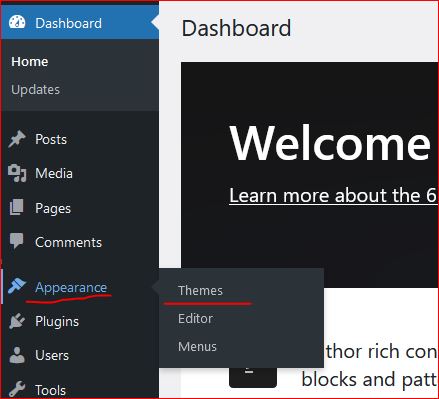
  • In wordpress Appearance feature on the left a Theme can be selected. Theme is a ready made look and feel of the website.
    Theme allows to set the Header, Body, Sidebars, footers, images and all the UI elements. So a nice looking, full of feature suitable theme can be selected for the website.
  • Another way is to create one UI from scratch, this needs an expert level of experience in web designing and UI modelling.
    Creating the design is not suggested unless experts and experienced people are not involved in the project development.
    Also this may take longer to develop a project from scratch.
Create a Post

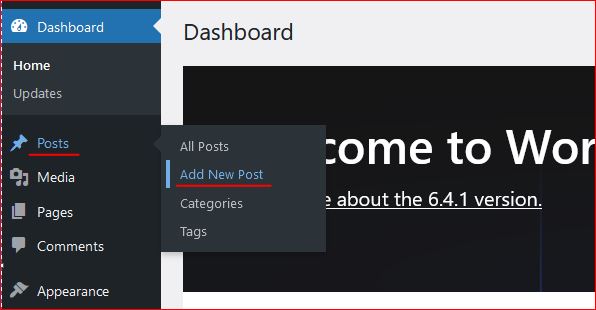
Login to wordpress and click on Posts -> Add New, this opens the editor to compose your contents.

WordPress editor is very rich and this facilitates to format text, image, lists, and many more things.
Follow the below image to open a new post editor.
On the right section, associate this post to a “Category” so that the post is always collected together in the related categories. Now lets see how to create category.

Category

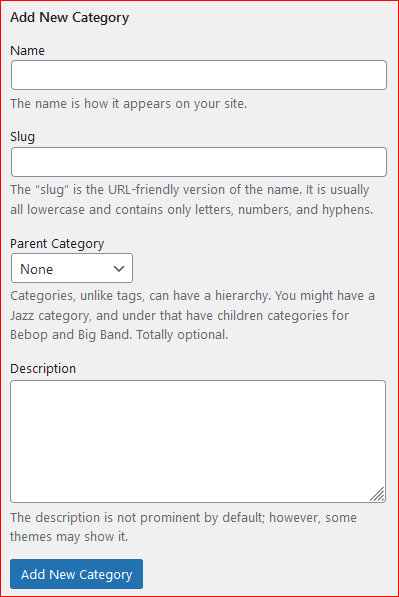
To create a category again click on the Posts, the sub menu opens up. Click on Categories, this opens a page to profide the name for the categories to be created.


Give a name, slug (part of url) and the parent category to which this should be associated with, a description and then click on “Add new Category” this creates the category and moves as a row on the right side table.
Publish the post

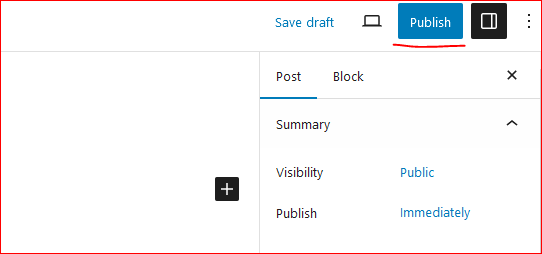
On the top right corner of the page there is a button to publish the page to the internet.
Click on “Publish”, this will publish your post to internet.
Now this can be viewed on internet.

So how to update the existing post. Click on Edit the post and once the post page opens the “Publish” button changes to “Update”.

Once the page is edited, either save or click on “Update” this updates the post on internet.
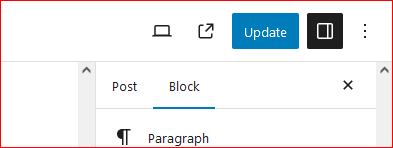
Continue creating the post and let the world know about your ideas, thoughts and many more.

Happy Hosting !!!! @https://hostingcloud9.com


4,938 responses to “How to host wordpress site and blogs”

  1. 전자담배 액상추천 Avatar

    Magnificent beat ! I wish to apprentice while
    you amend your web site, how can i subscribe for a blog site?
    The account aided me a acceptable deal. I had been a little bit acquainted of this your broadcast
    offered bright clear idea

  2. Xuvantrapex Erfahrungen Avatar

    Hey there! I’ve been reading your website for some time now and
    finally got the bravery to go ahead and give you a shout out
    from Dallas Texas! Just wanted to tell you keep up the fantastic work!

  3. Блокчейн и QR: идеальный дуэт для оплаты Avatar

    Ого, ты уже пробовал платить криптой по QR-коду?

    Криптовалюты сейчас взрывают мир, и
    это не просто слова! Забудь про долгие переводы или возню с кошельками — один клик, и ты в деле!
    И знаешь, это не так сложно, как кажется!
    Блокчейн и QR: идеальный дуэт для оплаты

    Серьёзно, первый раз оплатил доставку криптой через QR, и это было будто я хакер.

    Просто запустил кошелёк, навёл камеру на QR-код,
    и всё, оплата прошла! Теперь я прям фанат этого способа,
    и тебе советую попробовать.
    Как это работает?
    Чтобы оплатить что-то криптой по QR-коду, тебе нужен мобильное приложение с
    поддержкой QR. Скачай, например, Trust Wallet, или любое приложение,
    где есть сканер QR-кодов. В магазине или онлайн тебе показывают QR-код, ты его открываешь в приложении,
    жмёшь «Оплатить», и готово! Crypto Pay
    by Code — Плати криптой по коду

    Знаешь, что бесит? Долгие переводы с кучей комиссий.
    А тут — раз, и готово! И главное — безопасно: QR-коды шифруют данные.
    Попробовал оплатить кофе — и ни одной проблемы,
    всё летает!
    Где можно платить криптой
    по QR?
    Крипта по QR-коду уже внедряется в магазины, кафе и даже онлайн-сервисы.
    Видел, как в онлайн-магазинах
    всё чаще берут крипту по QR? Просто ищи значок крипты на кассе
    или спроси у продавца — они
    обычно в курсе. Оплата криптой через QR:
    пошаговая инструкция

    Онлайн это ещё проще: многие интернет-магазины добавляют оплату криптой через QR.
    Заходишь на сайт, выбираешь «Оплатить криптовалютой», сканируешь QR-код, и оплата прошла!
    Попробовал оплатить онлайн-курс через QR —
    и это было легко и просто.

    Чем QR-оплата цепляет?
    Оплата криптой по QR-коду — это не только быстро, но и
    шаг в будущее. Ты не зависишь от банков, комиссий за переводы и прочей бюрократии.
    Плюс, это анонимно, если тебе важна приватность.

    И знаешь, что ещё? Это просто затягивает!
    Сканируешь QR, подтверждаешь, и бац
    — ты уже на волне технологий!
    Просто попробуй — это реально круто!
    Попробуй платить криптой по QR — понравится

    Готов попробовать?
    Серьёзно, QR и крипта — это скорость в твоём
    кармане! Попробуй один раз, и, держу пари, ты
    не захочешь возвращаться к картам.
    Бери телефон, попробуй оплатить — и делись впечатлениями!

    А ты уже пробовал платить криптой по
    QR? Какой у тебя опыт?
    Как начать принимать крипту через QR-коды http://besko-eng.com/board_CSUA88/1014

Leave a Reply to online dispensary that ships to all states Cancel reply

Your email address will not be published. Required fields are marked *

About Us

We are enthusiastic, new world thinkers to give opportunity to all to learn the basic skills and take this to the next level.

Featured Posts

    Categories