How to host wordpress site and blogs

As well known in the market wordpress is a known CMS software with rich GUI, Plugins, SEO and support for multiple technologies through scripts and plugins.

How to create a good looking UI for the website.

Great UI is really the crowd puller so a website owner must think to produce a great UI with good functionalities.
Now coming to the point how this can be created –

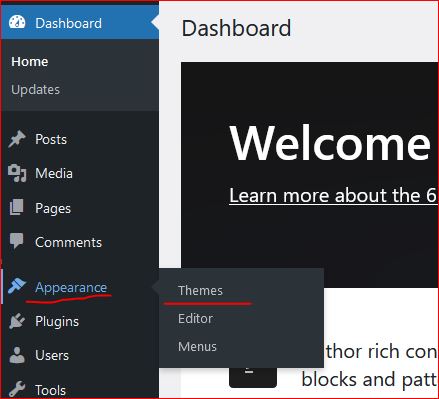
  • In wordpress Appearance feature on the left a Theme can be selected. Theme is a ready made look and feel of the website.
    Theme allows to set the Header, Body, Sidebars, footers, images and all the UI elements. So a nice looking, full of feature suitable theme can be selected for the website.
  • Another way is to create one UI from scratch, this needs an expert level of experience in web designing and UI modelling.
    Creating the design is not suggested unless experts and experienced people are not involved in the project development.
    Also this may take longer to develop a project from scratch.
Create a Post

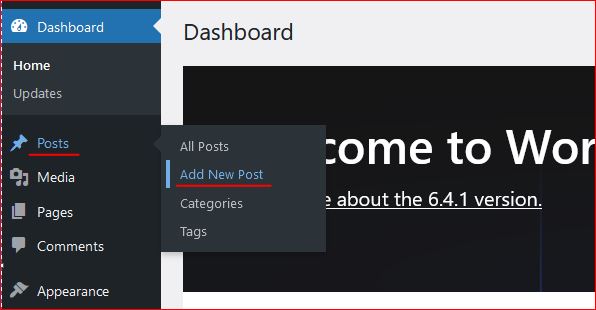
Login to wordpress and click on Posts -> Add New, this opens the editor to compose your contents.

WordPress editor is very rich and this facilitates to format text, image, lists, and many more things.
Follow the below image to open a new post editor.
On the right section, associate this post to a “Category” so that the post is always collected together in the related categories. Now lets see how to create category.

Category

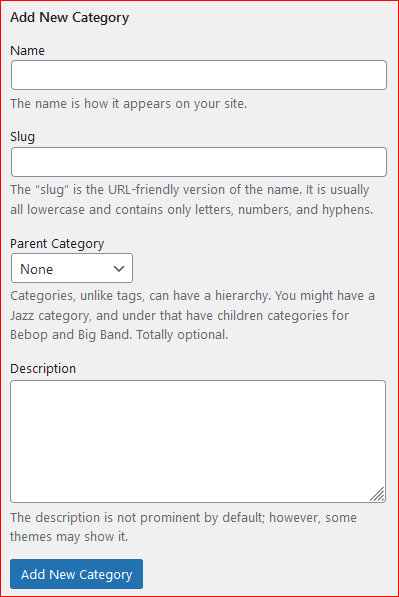
To create a category again click on the Posts, the sub menu opens up. Click on Categories, this opens a page to profide the name for the categories to be created.


Give a name, slug (part of url) and the parent category to which this should be associated with, a description and then click on “Add new Category” this creates the category and moves as a row on the right side table.
Publish the post

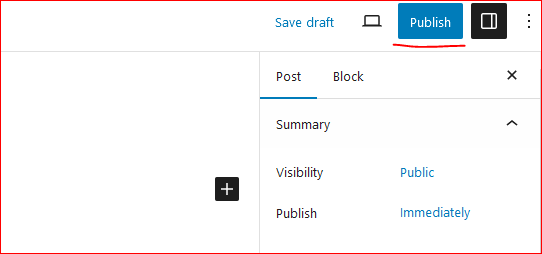
On the top right corner of the page there is a button to publish the page to the internet.
Click on “Publish”, this will publish your post to internet.
Now this can be viewed on internet.

So how to update the existing post. Click on Edit the post and once the post page opens the “Publish” button changes to “Update”.

Once the page is edited, either save or click on “Update” this updates the post on internet.
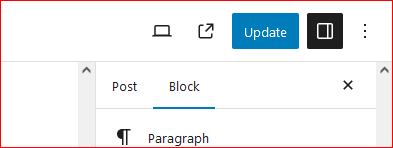
Continue creating the post and let the world know about your ideas, thoughts and many more.

Happy Hosting !!!! @https://hostingcloud9.com


4,868 responses to “How to host wordpress site and blogs”

  1. 전자담배 쇼핑몰 Avatar

    Hi there! Do you use Twitter? I’d like to follow you if that would be ok.

    I’m definitely enjoying your blog and look forward to new posts.

  2. Monvaul Avatar

    Hey very nice web site!! Man .. Excellent ..
    Wonderful .. I’ll bookmark your site and take the feeds also?
    I’m glad to seek out numerous useful information right here within the
    put up, we want develop extra techniques in this regard, thank you for sharing.
    . . . . .

  3. Eryxavin Avatar

    Hi there, I discovered your website by the use of Google even as searching for a similar topic, your website came up, it appears to be like great.
    I have bookmarked it in my google bookmarks.
    Hi there, just turned into alert to your blog through Google, and
    found that it’s truly informative. I’m going to watch out for brussels.
    I’ll be grateful in case you continue this in future.
    A lot of other people might be benefited out of your writing.
    Cheers!

  4. Frame Avapro 2U Avatar

    This paragraph offers clear idea designed for the new viewers of blogging, that in fact how to do running
    a blog.

  5. Apoge Dexlink Avatar

    Wow, incredible blog layout! How long have you been blogging for?
    you make blogging look easy. The overall look of your web site
    is wonderful, let alone the content!

  6. 일회용 전자담배 Avatar

    Ahaa, its fastidious dialogue concerning this
    paragraph at this place at this web site, I have read all that, so now me also commenting at this place.

  7. jilikk Avatar

    Really interesting read! The focus on visual cues in modern slots-like the color-coded probability indicators at jilikk game-can really help players understand the game. It’s not just luck, it’s informed play! ✨

  8. jili77games Avatar

    Interesting points about maximizing returns – it’s all about informed decisions! Seeing platforms like jili77 games online casino focus on user experience & security is a big plus for Filipino players. Smooth registration is key!

  9. Eryxavin Avatar

    Hello, its pleasant piece of writing about media print, we all be aware
    of media is a impressive source of data.

  10. 전자담배 기기 Avatar

    Hello are using WordPress for your site platform?
    I’m new to the blog world but I’m trying to get started and set up my own. Do you need any html coding expertise to make your own blog?

    Any help would be greatly appreciated!

Leave a Reply to Miranda Moreb Cancel reply

Your email address will not be published. Required fields are marked *

About Us

We are enthusiastic, new world thinkers to give opportunity to all to learn the basic skills and take this to the next level.

Featured Posts

    Categories