How to host wordpress site and blogs

As well known in the market wordpress is a known CMS software with rich GUI, Plugins, SEO and support for multiple technologies through scripts and plugins.

How to create a good looking UI for the website.

Great UI is really the crowd puller so a website owner must think to produce a great UI with good functionalities.
Now coming to the point how this can be created –

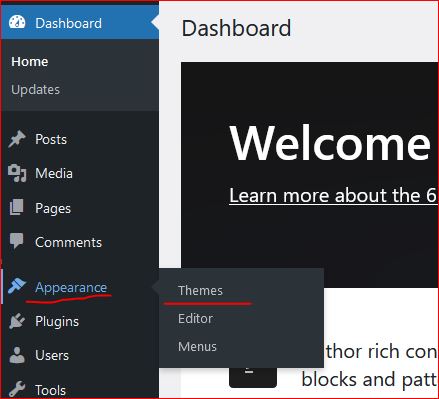
  • In wordpress Appearance feature on the left a Theme can be selected. Theme is a ready made look and feel of the website.
    Theme allows to set the Header, Body, Sidebars, footers, images and all the UI elements. So a nice looking, full of feature suitable theme can be selected for the website.
  • Another way is to create one UI from scratch, this needs an expert level of experience in web designing and UI modelling.
    Creating the design is not suggested unless experts and experienced people are not involved in the project development.
    Also this may take longer to develop a project from scratch.
Create a Post

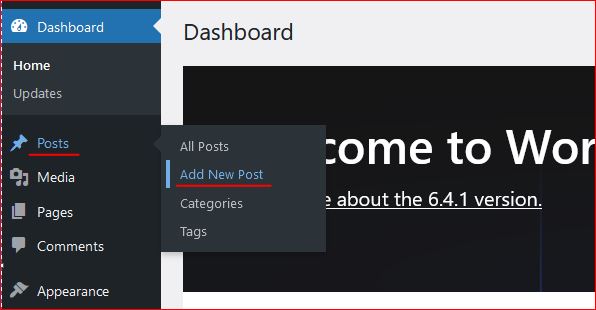
Login to wordpress and click on Posts -> Add New, this opens the editor to compose your contents.

WordPress editor is very rich and this facilitates to format text, image, lists, and many more things.
Follow the below image to open a new post editor.
On the right section, associate this post to a “Category” so that the post is always collected together in the related categories. Now lets see how to create category.

Category

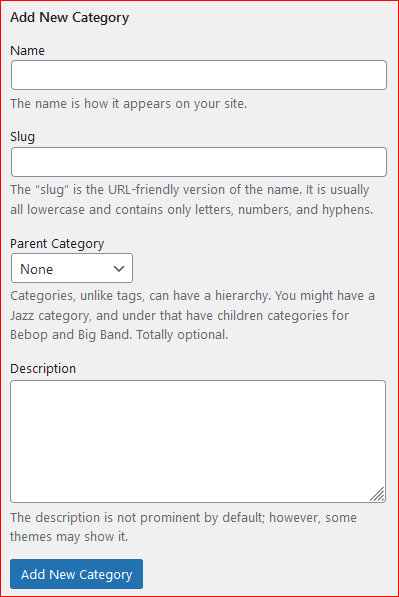
To create a category again click on the Posts, the sub menu opens up. Click on Categories, this opens a page to profide the name for the categories to be created.


Give a name, slug (part of url) and the parent category to which this should be associated with, a description and then click on “Add new Category” this creates the category and moves as a row on the right side table.
Publish the post

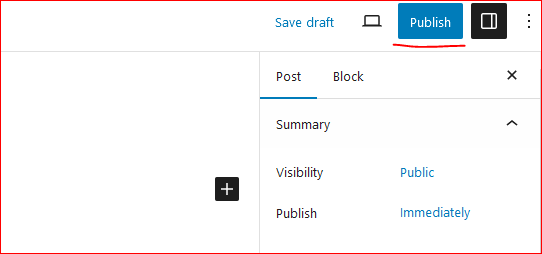
On the top right corner of the page there is a button to publish the page to the internet.
Click on “Publish”, this will publish your post to internet.
Now this can be viewed on internet.

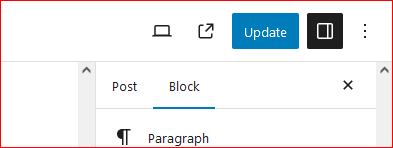
So how to update the existing post. Click on Edit the post and once the post page opens the “Publish” button changes to “Update”.

Once the page is edited, either save or click on “Update” this updates the post on internet.
Continue creating the post and let the world know about your ideas, thoughts and many more.

Happy Hosting !!!! @https://hostingcloud9.com


4,790 responses to “How to host wordpress site and blogs”

  1. biomaser pmu machine Avatar

    I’ve been browsing on-line more than three hours today, but I by no means found any interesting article like yours. It?s beautiful price sufficient for me. In my opinion, if all website owners and bloggers made good content material as you did, the internet might be a lot more useful than ever before.

  2. webpage Avatar

    It’s not my first time to visit this web site, i am browsing this website
    dailly and get fastidious information from
    here daily.

  3. web page Avatar

    Аренда квартир посуточно

    Квартиры посуточно — это идеальное решение для тех, кто ценит домашнюю
    атмосферу.

    – Полностью оборудованная кухня.

    – Свободное пространство и
    несколько комнат.
    – Идеально для длительных
    остановок.
    бронирование посуточных квартир в петербурге

    @airbn@b77 https://sutochny.ru

  4. best pmu ink Avatar

    Just wish to say your article is as amazing. The clearness in your post is simply great and i can assume you’re an expert on this subject. Fine with your permission allow me to grab your feed to keep up to date with forthcoming post. Thanks a million and please continue the enjoyable work.

  5. nhà cái G28 Avatar

    Hey would you mind sharing which blog platform you’re using?
    I’m going to start my own blog soon but I’m having a tough time deciding
    between BlogEngine/Wordpress/B2evolution and Drupal.
    The reason I ask is because your design seems different then most blogs and I’m looking for
    something completely unique. P.S
    Apologies for getting off-topic but I had to ask!

  6. Finance Éclairée Avatar

    I am truly happy to read this webpage posts which carries plenty of useful facts, thanks
    for providing these kinds of information.

  7. Haltrovex Avatar

    Currently it seems like Drupal is the best blogging platform available right now.
    (from what I’ve read) Is that what you are using on your blog?

  8. Investpro Ai Avatar

    My relatives all the time say that I am killing my time here at
    net, however I know I am getting experience every day by reading
    such fastidious articles or reviews.

  9. nhà cái PS99 Avatar

    Having read this I thought it was really enlightening. I appreciate you spending
    some time and energy to put this short article together.
    I once again find myself personally spending a significant amount
    of time both reading and leaving comments. But so what,
    it was still worthwhile!

  10. Finxor GPT Avatar

    I will right away take hold of your rss as I can not to
    find your email subscription hyperlink or newsletter service.

    Do you have any? Kindly permit me recognise so that I may just subscribe.

    Thanks.

Leave a Reply to novoland eagle flag 2019 บรรยายไทย Cancel reply

Your email address will not be published. Required fields are marked *

About Us

We are enthusiastic, new world thinkers to give opportunity to all to learn the basic skills and take this to the next level.

Featured Posts

    Categories