How to host wordpress site and blogs

As well known in the market wordpress is a known CMS software with rich GUI, Plugins, SEO and support for multiple technologies through scripts and plugins.

How to create a good looking UI for the website.

Great UI is really the crowd puller so a website owner must think to produce a great UI with good functionalities.
Now coming to the point how this can be created –

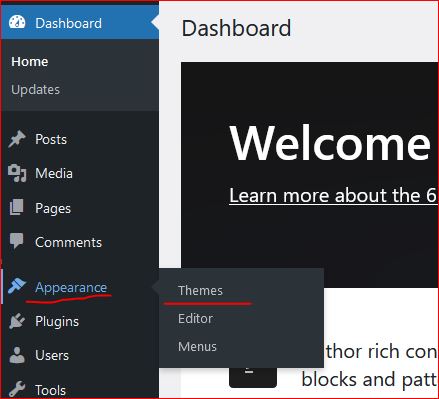
  • In wordpress Appearance feature on the left a Theme can be selected. Theme is a ready made look and feel of the website.
    Theme allows to set the Header, Body, Sidebars, footers, images and all the UI elements. So a nice looking, full of feature suitable theme can be selected for the website.
  • Another way is to create one UI from scratch, this needs an expert level of experience in web designing and UI modelling.
    Creating the design is not suggested unless experts and experienced people are not involved in the project development.
    Also this may take longer to develop a project from scratch.
Create a Post

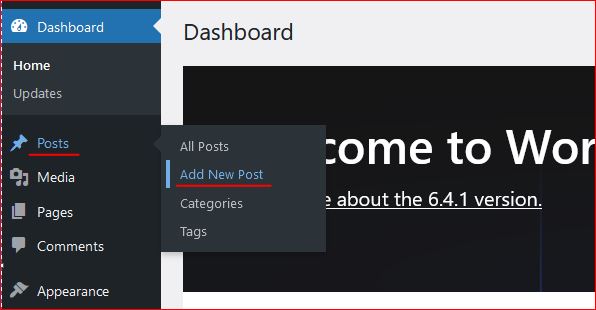
Login to wordpress and click on Posts -> Add New, this opens the editor to compose your contents.

WordPress editor is very rich and this facilitates to format text, image, lists, and many more things.
Follow the below image to open a new post editor.
On the right section, associate this post to a “Category” so that the post is always collected together in the related categories. Now lets see how to create category.

Category

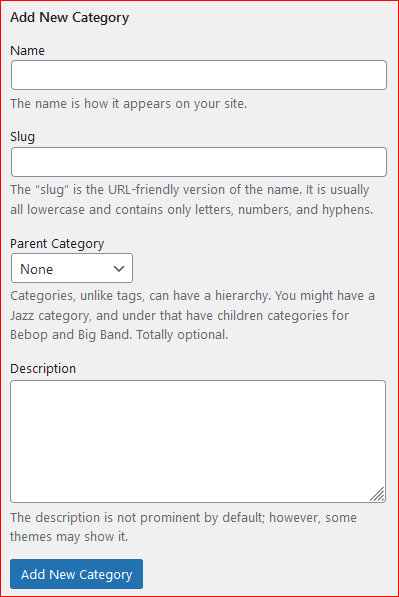
To create a category again click on the Posts, the sub menu opens up. Click on Categories, this opens a page to profide the name for the categories to be created.


Give a name, slug (part of url) and the parent category to which this should be associated with, a description and then click on “Add new Category” this creates the category and moves as a row on the right side table.
Publish the post

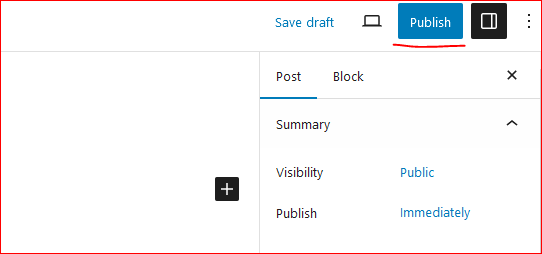
On the top right corner of the page there is a button to publish the page to the internet.
Click on “Publish”, this will publish your post to internet.
Now this can be viewed on internet.

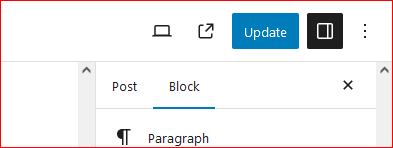
So how to update the existing post. Click on Edit the post and once the post page opens the “Publish” button changes to “Update”.

Once the page is edited, either save or click on “Update” this updates the post on internet.
Continue creating the post and let the world know about your ideas, thoughts and many more.

Happy Hosting !!!! @https://hostingcloud9.com


4,778 responses to “How to host wordpress site and blogs”

  1. Xoilac Avatar

    This info is invaluable. When can I find out more?

  2. Bitalfard Avatar

    Hi, everything is going perfectly here and ofcourse every one is
    sharing data, that’s actually good, keep up writing.

  3. رفع سیگنال ضعیف در روستا Avatar

    I like the helpful information you supply to your articles.
    I’ll bookmark your weblog and take a look at again right here regularly.
    I’m moderately certain I will be told a lot of new stuff right here!
    Good luck for the following!

  4. جمع اوری دستگاه های تقویت انتن موبایل Avatar

    Hello would you mind letting me know which hosting company you’re utilizing?
    I’ve loaded your blog in 3 different web browsers and I must say this blog loads a lot faster then most.
    Can you recommend a good internet hosting provider at a reasonable price?
    Kudos, I appreciate it!

  5. راهنمای خرید تقویت انتن موبایل Avatar

    Amazing issues here. I’m very happy to peer your article.
    Thanks so much and I am having a look ahead to
    contact you. Will you kindly drop me a e-mail?

  6. تقویت کننده آنتن موبایل Avatar

    What a information of un-ambiguity and preserveness of precious familiarity on the topic of unpredicted emotions.

  7. کاربرد تقویت انتن موبایل Avatar

    Hi there, just became alert to your blog through Google,
    and found that it’s truly informative. I’m going to watch out for brussels.
    I’ll appreciate if you continue this in future. A lot of
    people will be benefited from your writing. Cheers!

  8. لینک به بلاگ تقویت در زیزمین Avatar

    Hello I am so grateful I found your blog, I really found you
    by mistake, while I was researching on Aol for something
    else, Nonetheless I am here now and would just like to say thanks a lot for a tremendous post and a all round thrilling blog (I also love the theme/design), I
    don’t have time to go through it all at the moment but I have book-marked it and also added in your RSS feeds, so
    when I have time I will be back to read more, Please do keep up the awesome job.

  9. چطور تقویت انتن موبایل را راه اندازی کنم Avatar

    This piece of writing will assist the internet users for setting
    up new webpage or even a weblog from start to end.

  10. дебетовая карта на дом Avatar

    Спасибо, этот веб-сайт чрезвычайно полезный.
    Посетите также мою страничку
    дебетовая карта на дом дебетовая карта альфа газпромбанк дебетовая
    карта https://banksh.ru/category/luchshie-kreditnye-predlozheniya/

Leave a Reply to KON88 Cancel reply

Your email address will not be published. Required fields are marked *

About Us

We are enthusiastic, new world thinkers to give opportunity to all to learn the basic skills and take this to the next level.

Featured Posts

    Categories