How to host wordpress site and blogs

As well known in the market wordpress is a known CMS software with rich GUI, Plugins, SEO and support for multiple technologies through scripts and plugins.

How to create a good looking UI for the website.

Great UI is really the crowd puller so a website owner must think to produce a great UI with good functionalities.
Now coming to the point how this can be created –

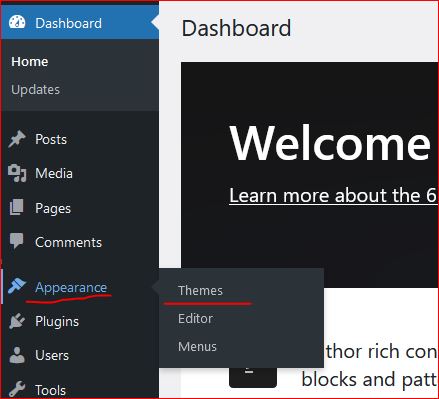
  • In wordpress Appearance feature on the left a Theme can be selected. Theme is a ready made look and feel of the website.
    Theme allows to set the Header, Body, Sidebars, footers, images and all the UI elements. So a nice looking, full of feature suitable theme can be selected for the website.
  • Another way is to create one UI from scratch, this needs an expert level of experience in web designing and UI modelling.
    Creating the design is not suggested unless experts and experienced people are not involved in the project development.
    Also this may take longer to develop a project from scratch.
Create a Post

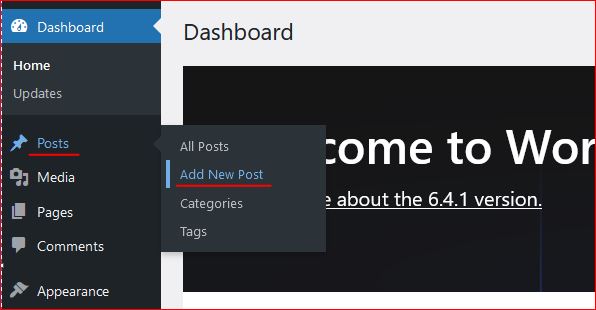
Login to wordpress and click on Posts -> Add New, this opens the editor to compose your contents.

WordPress editor is very rich and this facilitates to format text, image, lists, and many more things.
Follow the below image to open a new post editor.
On the right section, associate this post to a “Category” so that the post is always collected together in the related categories. Now lets see how to create category.

Category

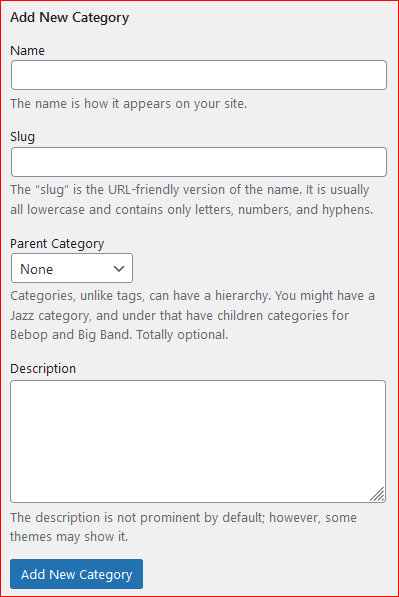
To create a category again click on the Posts, the sub menu opens up. Click on Categories, this opens a page to profide the name for the categories to be created.


Give a name, slug (part of url) and the parent category to which this should be associated with, a description and then click on “Add new Category” this creates the category and moves as a row on the right side table.
Publish the post

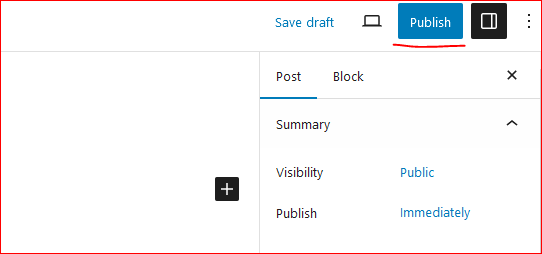
On the top right corner of the page there is a button to publish the page to the internet.
Click on “Publish”, this will publish your post to internet.
Now this can be viewed on internet.

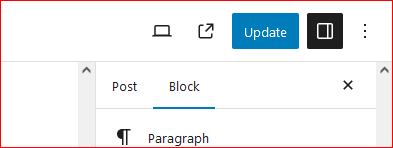
So how to update the existing post. Click on Edit the post and once the post page opens the “Publish” button changes to “Update”.

Once the page is edited, either save or click on “Update” this updates the post on internet.
Continue creating the post and let the world know about your ideas, thoughts and many more.

Happy Hosting !!!! @https://hostingcloud9.com


4,811 responses to “How to host wordpress site and blogs”

  1. Mexvorin Avatar

    Great goods from you, man. I have understand your stuff previous to and you are just extremely
    great. I actually like what you have acquired here, really like what you
    are stating and the way in which you say it.
    You make it entertaining and you still take care of to keep it smart.
    I can not wait to read far more from you. This is really a terrific website.

  2. Evo BridgeEvo Bridge Avatar

    It’s actually a great and useful piece of info. I’m
    happy that you simply shared this useful information with us.
    Please keep us up to date like this. Thanks for sharing.

  3. seo продвижение сайта в поисковых системах Avatar

    Отлично выглядящий сайт.
    Предполагаем, что вы сделали много вашего собственного кодирования.

    Посетите также мою страничку seo продвижение сайта в поисковых системах https://linksbuilder.fun/

  4. شقایق علی پور Avatar

    خرید استون – قیمت تگزاپون صدفی – قیمت استون

  5. Ordexiabot Avatar

    Greate article. Keep posting such kind of info on your page.
    Im really impressed by your site.
    Hi there, You’ve performed an incredible job.
    I’ll certainly digg it and personally suggest to my friends.
    I’m sure they’ll be benefited from this site.

  6. пинг для ускорение индексации Avatar

    С уважением за то, что поделились вашим
    потрясающий интернет-сайт.
    Посетите также мою страничку пинг для ускорение индексации http://bestceok.com/xe/index.php?mid=board_JsZV10&document_srl=491370

  7. Vektor Tradeviax Avatar

    Having read this I believed it was really enlightening.
    I appreciate you finding the time and effort to put this
    informative article together. I once again find myself
    personally spending way too much time both reading and posting comments.
    But so what, it was still worth it!

  8. Instant Payout Casinos Avatar

    Your style is so unique compared to other people I have read stuff from.
    Thanks for posting when you have the opportunity,
    Guess I’ll just bookmark this blog.

  9. tron generate address Avatar

    Thanks for the ideas you have contributed here. Another thing I would like to express is that computer system memory demands generally go up along with other innovations in the know-how. For instance, any time new generations of processors are made in the market, there is usually an equivalent increase in the dimensions demands of all computer system memory as well as hard drive space. This is because the software program operated simply by these cpus will inevitably boost in power to take advantage of the new technologies.

  10. Firmeza Corevia Avatar

    I am regular visitor, how are you everybody? This paragraph posted at
    this site is actually nice.

Leave a Reply to FortuixAgent Cancel reply

Your email address will not be published. Required fields are marked *

About Us

We are enthusiastic, new world thinkers to give opportunity to all to learn the basic skills and take this to the next level.

Featured Posts

    Categories