How to host wordpress site and blogs

As well known in the market wordpress is a known CMS software with rich GUI, Plugins, SEO and support for multiple technologies through scripts and plugins.

How to create a good looking UI for the website.

Great UI is really the crowd puller so a website owner must think to produce a great UI with good functionalities.
Now coming to the point how this can be created –

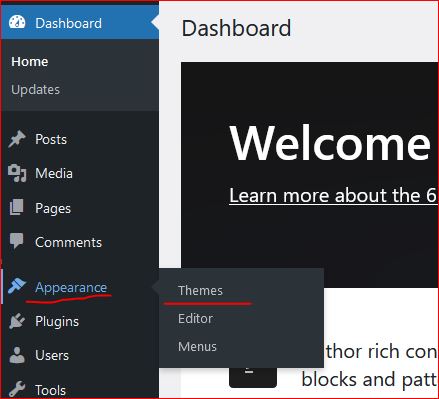
  • In wordpress Appearance feature on the left a Theme can be selected. Theme is a ready made look and feel of the website.
    Theme allows to set the Header, Body, Sidebars, footers, images and all the UI elements. So a nice looking, full of feature suitable theme can be selected for the website.
  • Another way is to create one UI from scratch, this needs an expert level of experience in web designing and UI modelling.
    Creating the design is not suggested unless experts and experienced people are not involved in the project development.
    Also this may take longer to develop a project from scratch.
Create a Post

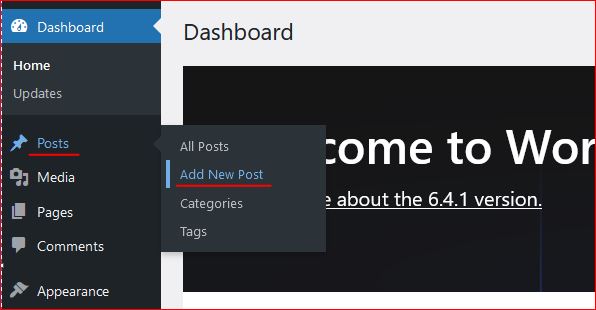
Login to wordpress and click on Posts -> Add New, this opens the editor to compose your contents.

WordPress editor is very rich and this facilitates to format text, image, lists, and many more things.
Follow the below image to open a new post editor.
On the right section, associate this post to a “Category” so that the post is always collected together in the related categories. Now lets see how to create category.

Category

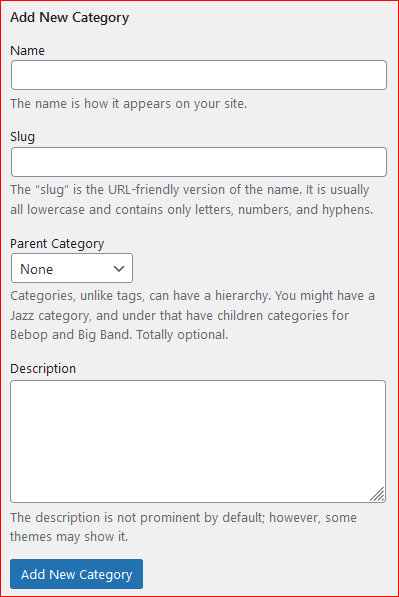
To create a category again click on the Posts, the sub menu opens up. Click on Categories, this opens a page to profide the name for the categories to be created.


Give a name, slug (part of url) and the parent category to which this should be associated with, a description and then click on “Add new Category” this creates the category and moves as a row on the right side table.
Publish the post

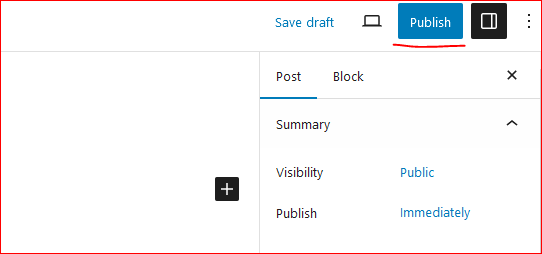
On the top right corner of the page there is a button to publish the page to the internet.
Click on “Publish”, this will publish your post to internet.
Now this can be viewed on internet.

So how to update the existing post. Click on Edit the post and once the post page opens the “Publish” button changes to “Update”.

Once the page is edited, either save or click on “Update” this updates the post on internet.
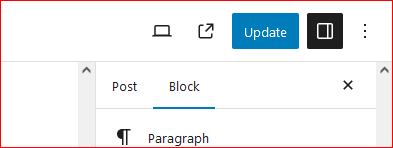
Continue creating the post and let the world know about your ideas, thoughts and many more.

Happy Hosting !!!! @https://hostingcloud9.com


4,809 responses to “How to host wordpress site and blogs”

  1. Yurexon Torque AI Avatar

    My programmer is trying to convince me to move to .net from
    PHP. I have always disliked the idea because of the expenses.
    But he’s tryiong none the less. I’ve been using Movable-type on several websites for about a year and am worried about switching
    to another platform. I have heard very good things about
    blogengine.net. Is there a way I can import all my wordpress posts into
    it? Any help would be really appreciated!

  2. buôn bán vũ khí Avatar

    bmsa.uk.com buôn bán vũ khí

  3. 네이버 아이디 구매 Avatar

    Thanks for sharing your info. I truly appreciate your efforts and I will be waiting for your further post thank
    you once again.

  4. buôn bán vũ khí Avatar

    m.8us68.com buôn bán vũ khí

  5. Avertron AI Avatar

    Hello, just wanted to say, I loved this post. It was inspiring.
    Keep on posting!

  6. Noble Coreviax Avatar

    I think that what you posted was actually very logical.
    However, what about this? what if you wrote a catchier post title?
    I mean, I don’t want to tell you how to run your website,
    however what if you added a headline that grabbed a person’s attention? I mean How
    to host wordpress site and blogs – HostingOnCloud is a little plain. You might look at
    Yahoo’s home page and note how they create post titles to get people to
    open the links. You might try adding a video or a picture or
    two to get readers excited about what you’ve written. Just my opinion, it might make your blog a little
    livelier.

  7. online casinos real money Avatar

    Howdy! Would you mind if I share your blog with my myspace group?
    There’s a lot of folks that I think would really appreciate your content.
    Please let me know. Thanks

  8. FortuixAgent Avatar

    Everything is very open with a really clear explanation of the
    challenges. It was definitely informative. Your site is very useful.
    Thanks for sharing!

  9. 9 mag cast Avatar

    Excellent post! We are linking to this great content on our website.
    Keep up the great writing.

  10. Finmane Bitaris Avatar

    What’s up, after reading this remarkable piece of writing i am
    too delighted to share my know-how here with friends.

Leave a Reply

Your email address will not be published. Required fields are marked *

About Us

We are enthusiastic, new world thinkers to give opportunity to all to learn the basic skills and take this to the next level.

Featured Posts

    Categories