How to host wordpress site and blogs

As well known in the market wordpress is a known CMS software with rich GUI, Plugins, SEO and support for multiple technologies through scripts and plugins.

How to create a good looking UI for the website.

Great UI is really the crowd puller so a website owner must think to produce a great UI with good functionalities.
Now coming to the point how this can be created –

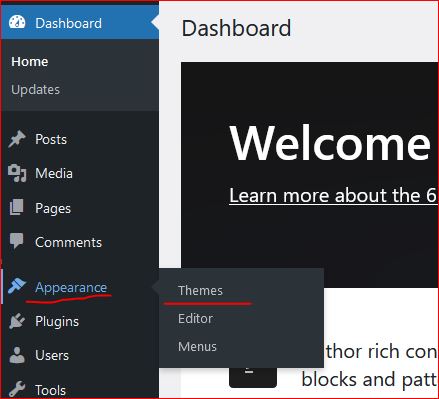
  • In wordpress Appearance feature on the left a Theme can be selected. Theme is a ready made look and feel of the website.
    Theme allows to set the Header, Body, Sidebars, footers, images and all the UI elements. So a nice looking, full of feature suitable theme can be selected for the website.
  • Another way is to create one UI from scratch, this needs an expert level of experience in web designing and UI modelling.
    Creating the design is not suggested unless experts and experienced people are not involved in the project development.
    Also this may take longer to develop a project from scratch.
Create a Post

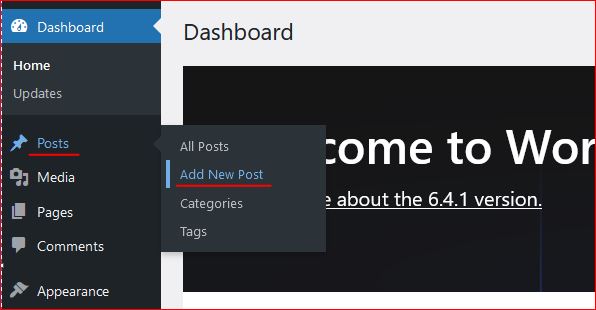
Login to wordpress and click on Posts -> Add New, this opens the editor to compose your contents.

WordPress editor is very rich and this facilitates to format text, image, lists, and many more things.
Follow the below image to open a new post editor.
On the right section, associate this post to a “Category” so that the post is always collected together in the related categories. Now lets see how to create category.

Category

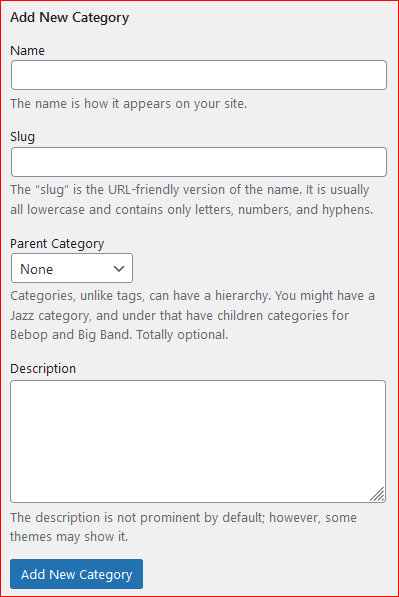
To create a category again click on the Posts, the sub menu opens up. Click on Categories, this opens a page to profide the name for the categories to be created.


Give a name, slug (part of url) and the parent category to which this should be associated with, a description and then click on “Add new Category” this creates the category and moves as a row on the right side table.
Publish the post

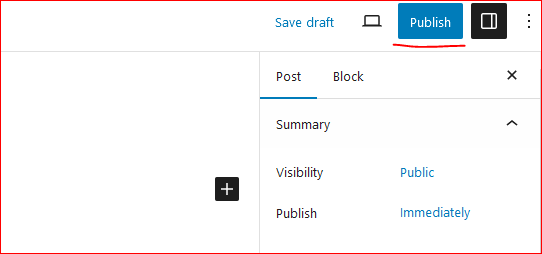
On the top right corner of the page there is a button to publish the page to the internet.
Click on “Publish”, this will publish your post to internet.
Now this can be viewed on internet.

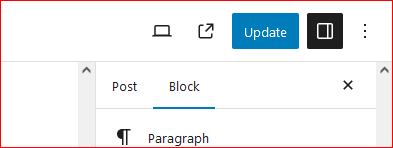
So how to update the existing post. Click on Edit the post and once the post page opens the “Publish” button changes to “Update”.

Once the page is edited, either save or click on “Update” this updates the post on internet.
Continue creating the post and let the world know about your ideas, thoughts and many more.

Happy Hosting !!!! @https://hostingcloud9.com


4,693 responses to “How to host wordpress site and blogs”

  1. Yoktogel Avatar

    Greetings! I know this is kinda off topic however , I’d figured I’d ask. Would you be interested in trading links or maybe guest authoring a blog article or vice-versa? My site addresses a lot of the same subjects as yours and I think we could greatly benefit from each other. If you’re interested feel free to shoot me an email. I look forward to hearing from you! Terrific blog by the way!

  2. 네이버 아이디 구매 Avatar

    Hello, i think that i saw you visited my blog so i came to “return the favor”.I’m attempting to
    find things to improve my site!I suppose its ok to use a few
    of your ideas!!

  3. https://789k-vn.com/ Avatar

    It’s hard to come by well-informed people on this topic,
    but you seem like you know what you’re talking about! Thanks

  4. Indratogel Avatar

    Hi there! I simply wish to give an enormous thumbs up for the nice info you might have right here on this post. I can be coming back to your blog for more soon.

  5. dreams wellness Avatar

    Normally I do not read post on blogs, but I wish to say that this write-up very forced me to try and do it! Your writing style has been surprised me. Thanks, quite nice post.

  6. Repère Valgain Avatar

    Hi there everyone, it’s my first pay a quick visit at
    this website, and article is actually fruitful for me, keep up posting such articles or reviews.

  7. Yowestogel Avatar

    I am now not sure where you’re getting your info, but good topic. I needs to spend some time finding out much more or figuring out more. Thank you for magnificent information I was in search of this information for my mission.

  8. Hujantoto Avatar

    Thank you for another informative website. Where else could I get that kind of information written in such an ideal way? I have a project that I am just now working on, and I’ve been on the look out for such info.

  9. Как начать принимать крипту через QR-коды Avatar

    Привет, знаешь, как легко платить криптой через QR?

    Криптовалюты сейчас взрывают мир, и это не просто слова!
    Забудь про долгие переводы или возню с
    кошельками — сканируешь и готово!
    Это реальная магия платежей, и я расскажу, как оно работает.

    Как начать принимать крипту через QR-коды

    Серьёзно, первый раз оплатил
    кофе криптой через QR, и это было
    легко и быстро. Больше не нужно ждать подтверждений.

    Теперь я прям фанат этого способа, и тебе советую попробовать.

    Как платить криптой по QR?

    Секрет прост: нужен телефон с криптокошельком.
    Выбери кошелёк типа MetaMask — главное, чтобы QR-коды умел
    считывать. На кассе или в интернет-магазине тебе дают QR-код, ты его считываешь, подтверждаешь сумму, и всё — сделка закрыта!
    One Tap Crypto Pay — Одна кнопка — и плата прошла

    Самое крутое — это удобство.
    Плюс, это безопасно: QR-код шифрует данные, так
    что твои биткоины в надёжных руках.
    Я как-то оплатил доставку пиццы
    через QR, и всё прошло без сучка и задоринки!

    Где можно платить криптой по QR?

    Крипта по QR-коду уже внедряется в магазины, кафе
    и даже онлайн-сервисы. Например, в
    некоторых магазинах в больших городах уже принимают USDT через QR-коды.

    Ищи логотипы криптовалют или спроси на кассе — многие в теме.
    безопасно

    В интернете вообще сказка: многие магазины уже поддерживают QR-оплату криптой.
    На сайте жмёшь «Оплатить криптой», сканируешь QR, и всё
    в порядке! Попробовал оплатить игру через QR —
    и это было легко и просто.
    Почему это круто?
    Оплата криптой по QR-коду — это не только быстро, но и шаг
    в будущее. Ты не зависишь от банков, комиссий за переводы и прочей головной боли.
    А ещё это защищает твои данные, что всегда плюс.

    Честно, платить криптой через QR — это
    прям кайф! Когда ты сканируешь код и видишь, как биткоины улетают за покупку, чувствуешь себя будто в sci-fi фильме.
    Попробуй сам, и поймёшь, о чём я!
    Простой способ приёма криптовалют — QR-коды

    Готов попробовать?
    Честно, оплата криптой по QR-коду — это реальная
    тема, и оно уже здесь! Попробуй один
    раз, и, держу пари, ты не захочешь возвращаться к
    старым способам. Просто установи аппку,
    найди место, где принимают крипту, и вперёд!

    А ты уже пробовал платить криптой
    по QR? Расскажи, как прошло!

    Когда камера стала кошельком https://tinyurl.com/antarctic-wallet

  10. casino online best payout Avatar

    It’s really a great and useful piece of info.
    I’m glad that you shared this helpful info with us.

    Please stay us informed like this. Thank you for sharing.

Leave a Reply to hellcase promo codes Cancel reply

Your email address will not be published. Required fields are marked *

About Us

We are enthusiastic, new world thinkers to give opportunity to all to learn the basic skills and take this to the next level.

Featured Posts

    Categories