How to host wordpress site and blogs

As well known in the market wordpress is a known CMS software with rich GUI, Plugins, SEO and support for multiple technologies through scripts and plugins.

How to create a good looking UI for the website.

Great UI is really the crowd puller so a website owner must think to produce a great UI with good functionalities.
Now coming to the point how this can be created –

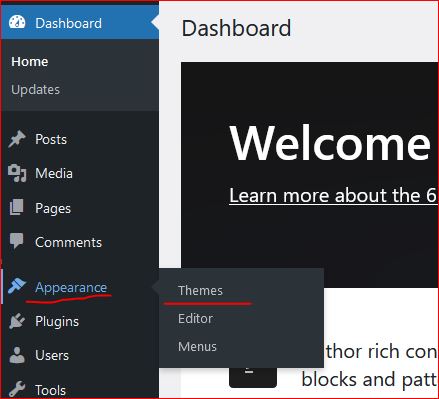
  • In wordpress Appearance feature on the left a Theme can be selected. Theme is a ready made look and feel of the website.
    Theme allows to set the Header, Body, Sidebars, footers, images and all the UI elements. So a nice looking, full of feature suitable theme can be selected for the website.
  • Another way is to create one UI from scratch, this needs an expert level of experience in web designing and UI modelling.
    Creating the design is not suggested unless experts and experienced people are not involved in the project development.
    Also this may take longer to develop a project from scratch.
Create a Post

Login to wordpress and click on Posts -> Add New, this opens the editor to compose your contents.

WordPress editor is very rich and this facilitates to format text, image, lists, and many more things.
Follow the below image to open a new post editor.
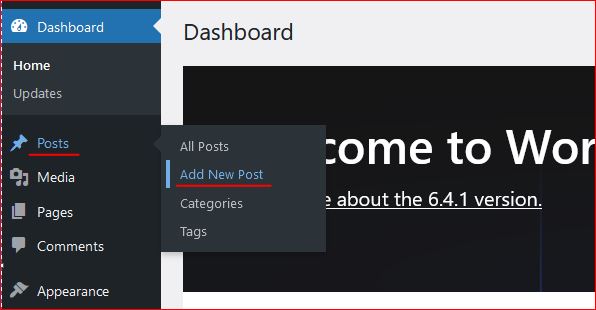
On the right section, associate this post to a “Category” so that the post is always collected together in the related categories. Now lets see how to create category.

Category

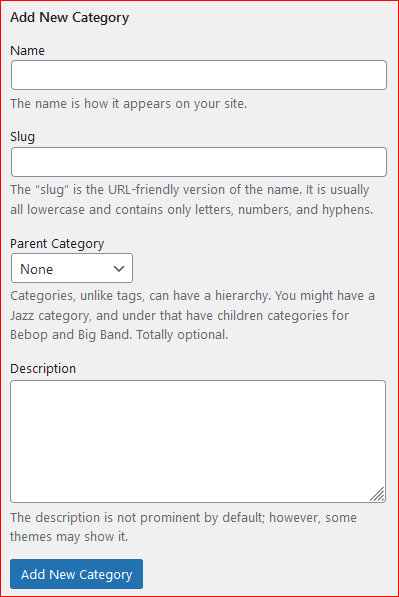
To create a category again click on the Posts, the sub menu opens up. Click on Categories, this opens a page to profide the name for the categories to be created.


Give a name, slug (part of url) and the parent category to which this should be associated with, a description and then click on “Add new Category” this creates the category and moves as a row on the right side table.
Publish the post

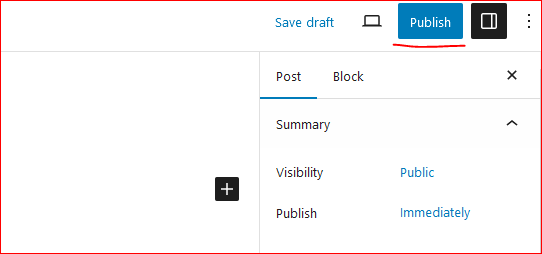
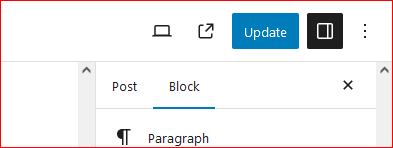
On the top right corner of the page there is a button to publish the page to the internet.
Click on “Publish”, this will publish your post to internet.
Now this can be viewed on internet.

So how to update the existing post. Click on Edit the post and once the post page opens the “Publish” button changes to “Update”.

Once the page is edited, either save or click on “Update” this updates the post on internet.
Continue creating the post and let the world know about your ideas, thoughts and many more.

Happy Hosting !!!! @https://hostingcloud9.com


4,679 responses to “How to host wordpress site and blogs”

  1. Veltrion Pulse 85 review Avatar

    fantastic points altogether, you simply won a brand new reader.
    What might you recommend about your publish that you made some days ago?
    Any sure?

  2. TR88 Avatar

    Heya i’m for the first time here. I found this board and I find It truly
    useful & it helped me out a lot. I hope to give something back and help others like you helped me.

  3. hair transplant istanbul price Avatar

    Hey there, You have done a great job. I?ll definitely digg it and in my view recommend to my friends. I’m confident they will be benefited from this site.

  4. the brain song download Avatar

    Harnessing the healing properties of plants, Website targets pelvic floor fungus, supports recovery, and helps you feel more confident.

  5. Rigoberto Wassenaar Avatar

    This is a great point! I saw something very similar in an article on m88vin, and it made me reflect on the issue in a new way.

  6. best bitcoin slots Avatar

    Hey are using WordPress for your blog platform? I’m new to the blog world but I’m trying to get started and create my own. Do you require any
    html coding knowledge to make your own blog?
    Any help would be really appreciated!

  7. hair transplant istanbul Avatar

    I was curious if you ever thought of changing the structure of your website? Its very well written; I love what youve got to say. But maybe you could a little more in the way of content so people could connect with it better. Youve got an awful lot of text for only having 1 or two images. Maybe you could space it out better?

  8. Protogel Avatar

    I think one of your ads triggered my browser to resize, you might want to put that on your blacklist.

  9. Redmont Luxentis Avatar

    Hi there, I believe your blog may be having web browser compatibility issues.
    When I take a look at your blog in Safari, it looks fine but when opening in IE, it
    has some overlapping issues. I just wanted to provide you with a quick heads up!
    Other than that, great website!

  10. Vumon Capital Avatar

    Hi! I’m at work surfing around your blog from my new iphone
    3gs! Just wanted to say I love reading your blog and look forward to all your posts!
    Keep up the superb work!

Leave a Reply to Silvenoxi Edge TEST Cancel reply

Your email address will not be published. Required fields are marked *

About Us

We are enthusiastic, new world thinkers to give opportunity to all to learn the basic skills and take this to the next level.

Featured Posts

    Categories