As well known in the market wordpress is a known CMS software with rich GUI, Plugins, SEO and support for multiple technologies through scripts and plugins.
How to create a good looking UI for the website.
Great UI is really the crowd puller so a website owner must think to produce a great UI with good functionalities.
Now coming to the point how this can be created –
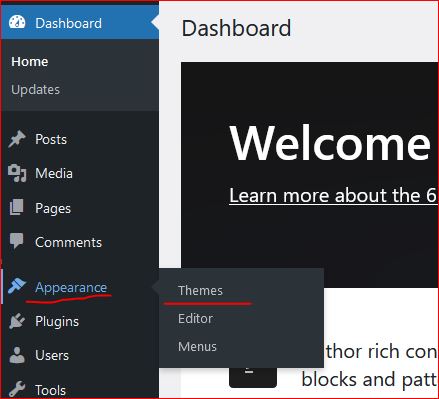
- In wordpress Appearance feature on the left a Theme can be selected. Theme is a ready made look and feel of the website.
Theme allows to set the Header, Body, Sidebars, footers, images and all the UI elements. So a nice looking, full of feature suitable theme can be selected for the website. - Another way is to create one UI from scratch, this needs an expert level of experience in web designing and UI modelling.
Creating the design is not suggested unless experts and experienced people are not involved in the project development.
Also this may take longer to develop a project from scratch.
Create a Post
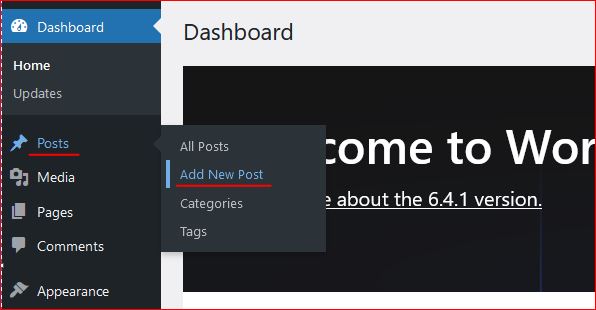
Login to wordpress and click on Posts -> Add New, this opens the editor to compose your contents.
WordPress editor is very rich and this facilitates to format text, image, lists, and many more things.
Follow the below image to open a new post editor.
On the right section, associate this post to a “Category” so that the post is always collected together in the related categories. Now lets see how to create category.
Category
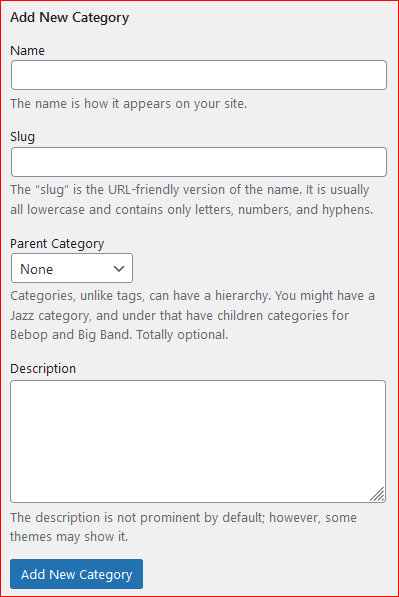
To create a category again click on the Posts, the sub menu opens up. Click on Categories, this opens a page to profide the name for the categories to be created.

Give a name, slug (part of url) and the parent category to which this should be associated with, a description and then click on “Add new Category” this creates the category and moves as a row on the right side table.
Publish the post
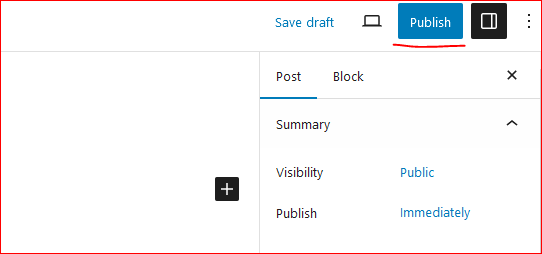
On the top right corner of the page there is a button to publish the page to the internet.
Click on “Publish”, this will publish your post to internet.
Now this can be viewed on internet.
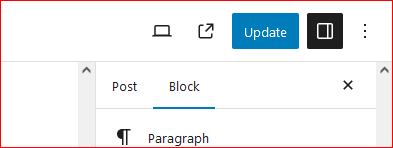
So how to update the existing post. Click on Edit the post and once the post page opens the “Publish” button changes to “Update”.
Once the page is edited, either save or click on “Update” this updates the post on internet.
Continue creating the post and let the world know about your ideas, thoughts and many more.
Happy Hosting !!!! @https://hostingcloud9.com


Leave a Reply