How to host wordpress site and blogs

As well known in the market wordpress is a known CMS software with rich GUI, Plugins, SEO and support for multiple technologies through scripts and plugins.

How to create a good looking UI for the website.

Great UI is really the crowd puller so a website owner must think to produce a great UI with good functionalities.
Now coming to the point how this can be created –

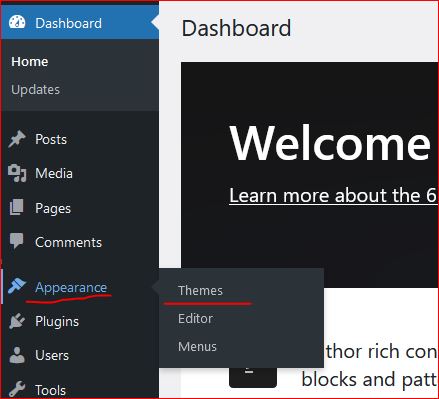
  • In wordpress Appearance feature on the left a Theme can be selected. Theme is a ready made look and feel of the website.
    Theme allows to set the Header, Body, Sidebars, footers, images and all the UI elements. So a nice looking, full of feature suitable theme can be selected for the website.
  • Another way is to create one UI from scratch, this needs an expert level of experience in web designing and UI modelling.
    Creating the design is not suggested unless experts and experienced people are not involved in the project development.
    Also this may take longer to develop a project from scratch.
Create a Post

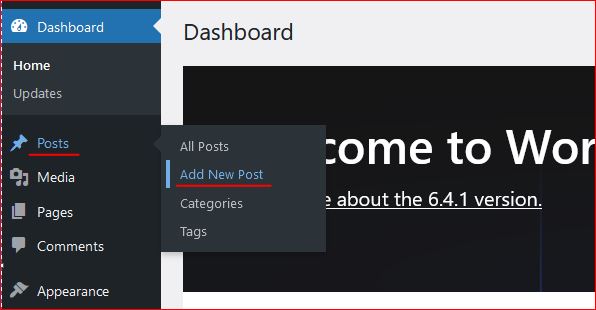
Login to wordpress and click on Posts -> Add New, this opens the editor to compose your contents.

WordPress editor is very rich and this facilitates to format text, image, lists, and many more things.
Follow the below image to open a new post editor.
On the right section, associate this post to a “Category” so that the post is always collected together in the related categories. Now lets see how to create category.

Category

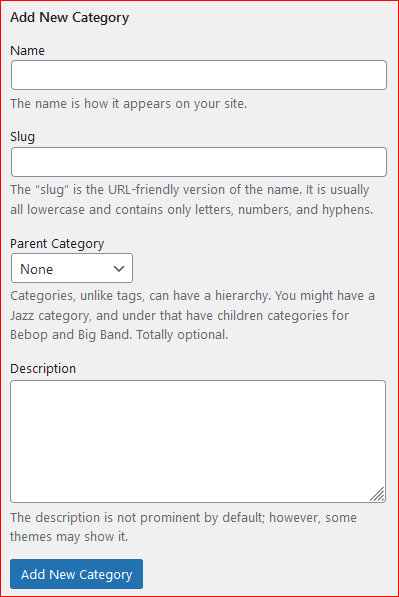
To create a category again click on the Posts, the sub menu opens up. Click on Categories, this opens a page to profide the name for the categories to be created.


Give a name, slug (part of url) and the parent category to which this should be associated with, a description and then click on “Add new Category” this creates the category and moves as a row on the right side table.
Publish the post

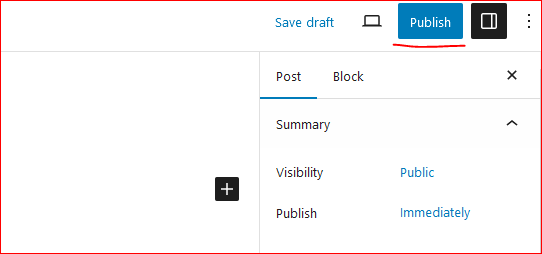
On the top right corner of the page there is a button to publish the page to the internet.
Click on “Publish”, this will publish your post to internet.
Now this can be viewed on internet.

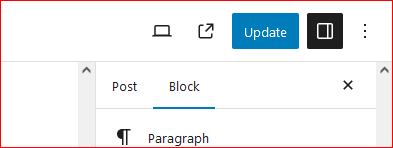
So how to update the existing post. Click on Edit the post and once the post page opens the “Publish” button changes to “Update”.

Once the page is edited, either save or click on “Update” this updates the post on internet.
Continue creating the post and let the world know about your ideas, thoughts and many more.

Happy Hosting !!!! @https://hostingcloud9.com


4,567 responses to “How to host wordpress site and blogs”

  1. tron suffix Avatar

    Wow! This could be one particular of the most beneficial blogs We’ve ever arrive across on this subject. Actually Excellent. I’m also a specialist in this topic so I can understand your hard work.

  2. Жильё посуточно Avatar

    Отели на сутки

    Отели — классика для путешественников и деловых людей.

    – Доступ к достопримечательностям.

    – Сервис: уборка, питание, ресепшн.

    – Можно выбрать уровень под свой бюджет.

    отели посуточно

    @airbn@b77 https://sutochny.ru/poleznyye-sovety/

  3. generate tron address Avatar

    Fantastic goods from you, man. I have understand your stuff previous to and you’re just extremely wonderful. I really like what you’ve acquired here, really like what you are stating and the way in which you say it. You make it enjoyable and you still care for to keep it smart. I cant wait to read much more from you. This is really a tremendous website.

  4. отели на сутки Avatar

    Спасибо за снабжения этого типа
    из очень хорошо знания.
    Посетите также мою страничку отели на сутки https://tiktur.ru/

  5. https://888-vnd.com/ Avatar

    Please let me know if you’re looking for
    a article writer for your blog. You have some really
    good posts and I think I would be a good asset. If you ever want
    to take some of the load off, I’d absolutely love to write some material
    for your blog in exchange for a link back to mine.

    Please blast me an email if interested. Many thanks!

  6. Виртуальные карты для онлайн-платежей Avatar

    Что такое XCARDS и стоит ли ей доверять?

    Совсем недавно заметил про финансовый сервис XCARDS, что помогает создавать цифровые дебетовые карты чтобы контролировать расходы.

    Особенности, на которые я обратил внимание:

    Карту можно выпустить за ~5 минут.

    Платформа даёт возможность оформить неограниченное количество карт.

    Служба поддержки доступна круглосуточно включая живое
    общение с оператором.
    Все операции отображаются моментально — транзакции,
    уведомления, аналитика — всё под рукой.

    Моменты, которые нужно учитывать:

    Локация компании: Мальта — желательно проверить, что
    сервис можно использовать
    без нарушений.

    Стоимость: возможно, есть дополнительные сборы,
    поэтому лучше просмотреть условия.

    Практический опыт: по публикациям на форумах
    вопросы решаются оперативно.

    Надёжность системы: все операции подтверждаются уведомлениями, но всегда лучше активировать 2FA.

    Итоги:
    На первый взгляд XCARDS — это
    удобным инструментом в онлайн-операций.

    Сервис совмещает интуитивный
    контроль и моментальный выпуск карт.

    А теперь — вопрос к вам
    Пробовали ли подобные сервисы?

    Напишите в комментариях Виртуальные
    карты для онлайн-платежей https://tinyurl.com/4h7kcs2r

Leave a Reply to たぐひ 古語 Cancel reply

Your email address will not be published. Required fields are marked *

About Us

We are enthusiastic, new world thinkers to give opportunity to all to learn the basic skills and take this to the next level.

Featured Posts

    Categories