How to host wordpress site and blogs

As well known in the market wordpress is a known CMS software with rich GUI, Plugins, SEO and support for multiple technologies through scripts and plugins.

How to create a good looking UI for the website.

Great UI is really the crowd puller so a website owner must think to produce a great UI with good functionalities.
Now coming to the point how this can be created –

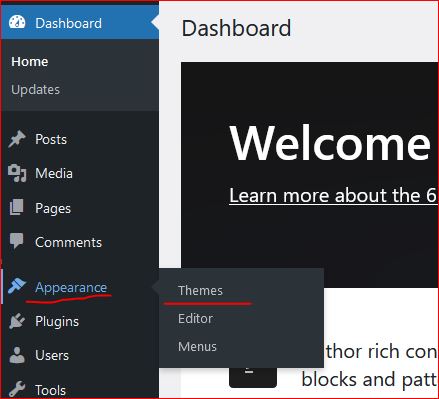
  • In wordpress Appearance feature on the left a Theme can be selected. Theme is a ready made look and feel of the website.
    Theme allows to set the Header, Body, Sidebars, footers, images and all the UI elements. So a nice looking, full of feature suitable theme can be selected for the website.
  • Another way is to create one UI from scratch, this needs an expert level of experience in web designing and UI modelling.
    Creating the design is not suggested unless experts and experienced people are not involved in the project development.
    Also this may take longer to develop a project from scratch.
Create a Post

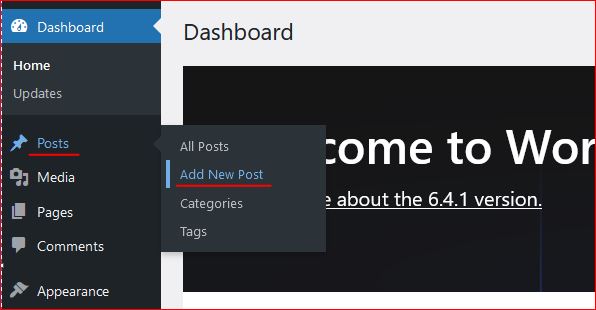
Login to wordpress and click on Posts -> Add New, this opens the editor to compose your contents.

WordPress editor is very rich and this facilitates to format text, image, lists, and many more things.
Follow the below image to open a new post editor.
On the right section, associate this post to a “Category” so that the post is always collected together in the related categories. Now lets see how to create category.

Category

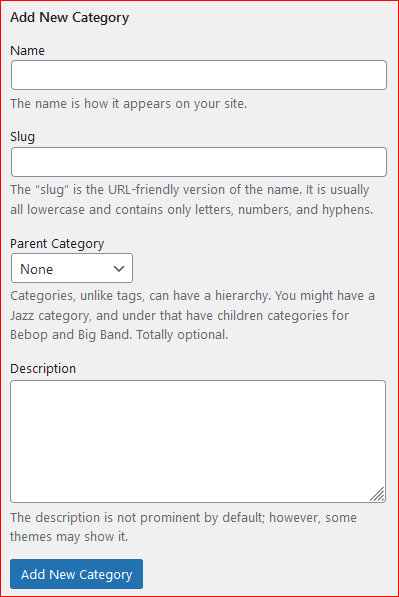
To create a category again click on the Posts, the sub menu opens up. Click on Categories, this opens a page to profide the name for the categories to be created.


Give a name, slug (part of url) and the parent category to which this should be associated with, a description and then click on “Add new Category” this creates the category and moves as a row on the right side table.
Publish the post

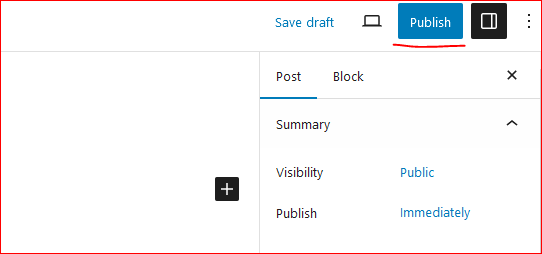
On the top right corner of the page there is a button to publish the page to the internet.
Click on “Publish”, this will publish your post to internet.
Now this can be viewed on internet.

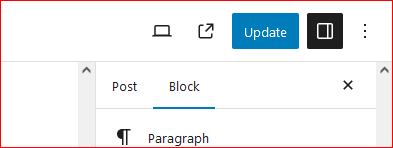
So how to update the existing post. Click on Edit the post and once the post page opens the “Publish” button changes to “Update”.

Once the page is edited, either save or click on “Update” this updates the post on internet.
Continue creating the post and let the world know about your ideas, thoughts and many more.

Happy Hosting !!!! @https://hostingcloud9.com


4,565 responses to “How to host wordpress site and blogs”

  1. Sterk Evolux Ervaringen Avatar

    whoah this blog is excellent i really like reading your
    posts. Stay up the good work! You know, lots of persons are looking around for this info, you
    can aid them greatly.

  2. insurance agency Mesa Avatar

    Heya i?m for the first time here. I found this board and I find It truly useful & it helped me out a lot. I hope to present something back and help others like you aided me.

  3. Link 888YES Avatar

    Heya i am for the first time here. I came across
    this board and I find It really helpful & it helped me out much.
    I’m hoping to offer something back and aid others such as you helped me.

  4. TOPVIP Avatar

    I do not even know how I ended up here, but I thought this post was great.

    I do not know who you are but certainly you are going to
    a famous blogger if you are not already 😉 Cheers!

  5. 888TOP Avatar

    Pretty! This has been an incredibly wonderful post. Thank you for providing these details.

  6. porn Avatar

    Good information. Lucky me I ran across your site by accident (stumbleupon). I have saved as a favorite for later.

  7. Filar Bitrevo Avatar

    Excellent post. I used to be checking constantly this
    weblog and I’m inspired! Extremely helpful info particularly the remaining part 🙂 I care for such information much.
    I was looking for this certain info for a long time.
    Thanks and good luck.

  8. Krysenvoxen Avatar

    When I originally commented I seem to have clicked on the -Notify me when new comments are added- checkbox and now whenever a comment is added I recieve 4 emails with the exact same comment.
    Perhaps there is an easy method you are able to remove me
    from that service? Thanks a lot!

  9. Btc 535 Elarion Avatar

    Hello there, just became alert to your blog through
    Google, and found that it’s truly informative. I’m gonna watch out for
    brussels. I’ll be grateful if you continue this in future.

    Numerous people will be benefited from your writing. Cheers!

  10. crack windows 7 ultimate 64 bit kmspico Avatar

    Very shortly this site will be famous amid all blogging
    and site-building users, due to it’s nice posts

Leave a Reply to Neronix 365 Profit Recensione Cancel reply

Your email address will not be published. Required fields are marked *

About Us

We are enthusiastic, new world thinkers to give opportunity to all to learn the basic skills and take this to the next level.

Featured Posts

    Categories