How to host wordpress site and blogs

As well known in the market wordpress is a known CMS software with rich GUI, Plugins, SEO and support for multiple technologies through scripts and plugins.

How to create a good looking UI for the website.

Great UI is really the crowd puller so a website owner must think to produce a great UI with good functionalities.
Now coming to the point how this can be created –

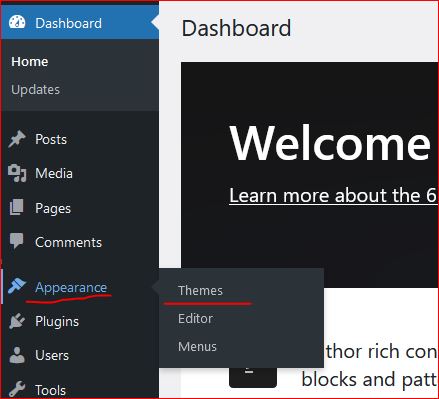
  • In wordpress Appearance feature on the left a Theme can be selected. Theme is a ready made look and feel of the website.
    Theme allows to set the Header, Body, Sidebars, footers, images and all the UI elements. So a nice looking, full of feature suitable theme can be selected for the website.
  • Another way is to create one UI from scratch, this needs an expert level of experience in web designing and UI modelling.
    Creating the design is not suggested unless experts and experienced people are not involved in the project development.
    Also this may take longer to develop a project from scratch.
Create a Post

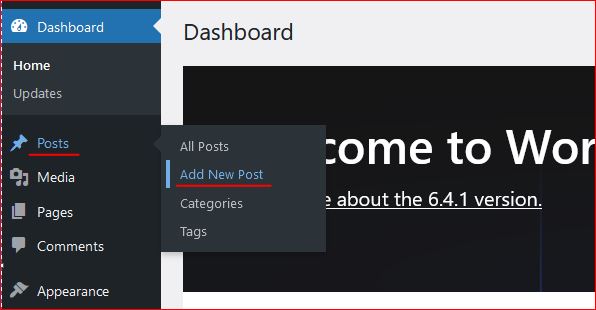
Login to wordpress and click on Posts -> Add New, this opens the editor to compose your contents.

WordPress editor is very rich and this facilitates to format text, image, lists, and many more things.
Follow the below image to open a new post editor.
On the right section, associate this post to a “Category” so that the post is always collected together in the related categories. Now lets see how to create category.

Category

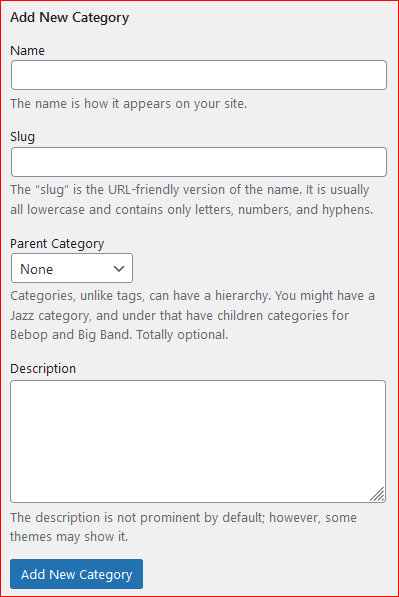
To create a category again click on the Posts, the sub menu opens up. Click on Categories, this opens a page to profide the name for the categories to be created.


Give a name, slug (part of url) and the parent category to which this should be associated with, a description and then click on “Add new Category” this creates the category and moves as a row on the right side table.
Publish the post

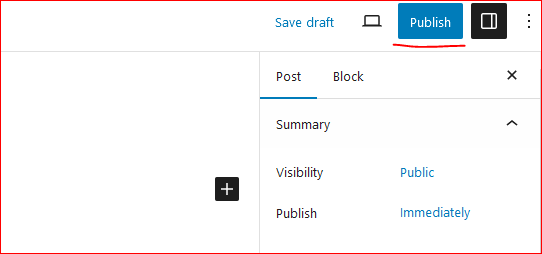
On the top right corner of the page there is a button to publish the page to the internet.
Click on “Publish”, this will publish your post to internet.
Now this can be viewed on internet.

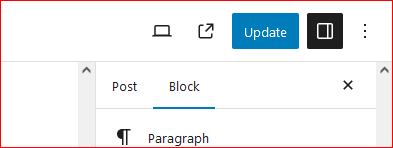
So how to update the existing post. Click on Edit the post and once the post page opens the “Publish” button changes to “Update”.

Once the page is edited, either save or click on “Update” this updates the post on internet.
Continue creating the post and let the world know about your ideas, thoughts and many more.

Happy Hosting !!!! @https://hostingcloud9.com


4,567 responses to “How to host wordpress site and blogs”

  1. nhà cái 888Now Avatar

    This is very attention-grabbing, You are an overly skilled blogger.
    I’ve joined your feed and look ahead to in the hunt for extra of your
    great post. Also, I have shared your website in my social networks

  2. pronail complex Avatar

    Website combines the healing power of plants to fight pelvic floor fungus, improve pelvic floor health, and restore confidence in your hands and feet.

  3. 888NOW Avatar

    I am extremely impressed with your writing skills and also with the layout on your blog.
    Is this a paid theme or did you modify it yourself? Anyway keep up the excellent quality writing, it
    is rare to see a great blog like this one today.

  4. https://magiamgiasoc.in.net/ Avatar

    Thanks for the good writeup. It in reality used to be a entertainment account it.
    Glance complicated to far brought agreeable from you!
    By the way, how could we communicate?

  5. Spotlight Evocorex legit or not Avatar

    It’s amazing to pay a visit this website and reading the views of all friends about this
    piece of writing, while I am also keen of getting familiarity.

  6. porn Avatar

    I was very pleased to discover this site. I wanted to thank you for ones time just for this fantastic read!! I definitely appreciated every part of it and i also have you book marked to look at new stuff in your web site.

  7. insurance agency near me Avatar

    Great write-up, I?m regular visitor of one?s website, maintain up the excellent operate, and It’s going to be a regular visitor for a long time.

  8. Ädel Finlore Rescenion Avatar

    Thank you for any other informative blog. The place
    else may just I get that kind of information written in such an ideal
    approach? I’ve a mission that I’m just now running on, and I have been at the
    look out for such info.

  9. 888 TOP Avatar

    I blog quite often and I really thank you for your information.
    Your article has really peaked my interest. I’m going to bookmark your website and keep
    checking for new details about once per week.
    I subscribed to your Feed as well.

  10. Capital Ai TEST Avatar

    Howdy would you mind letting me know which webhost you’re utilizing?
    I’ve loaded your blog in 3 different internet browsers and I must say this blog loads a lot
    faster then most. Can you suggest a good web hosting provider at a reasonable price?
    Kudos, I appreciate it!

Leave a Reply to 手のひらが熱い コロナ Cancel reply

Your email address will not be published. Required fields are marked *

About Us

We are enthusiastic, new world thinkers to give opportunity to all to learn the basic skills and take this to the next level.

Featured Posts

    Categories