How to create new user at hostingcloud9.com

Open the website url https:hostingcloud9.com and check the menu , click on the ‘Login’ link on the far right corner.

Now on the login page use the ‘Google Sign In’ button. Google signgle sign in is the best way to login. In this way user does not have to set any password or complete any verification. This is a One step process.
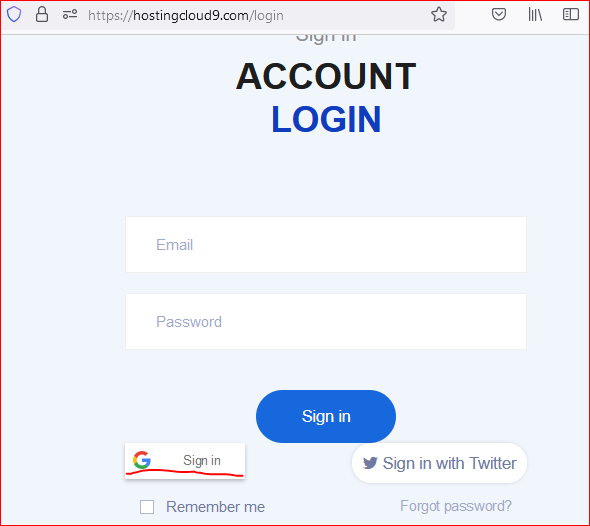
Once the login is completed any plan or a domain can be bought.

Once a plan is bought, in order to login to the control panel, use the configuration -> Hosting to create a Control Panel login.

Follow below advises to create the control panel.

  • Do NOT use your email to create the user name
  • Only use Lowercase
  • Only use alphabets and numbers e.g. rockstar, rocky2, gold1mine etc.
  • Keep the length between 6 and 30 characters
  • No space(s) in the username eg. kobra kai
  • Username must start with an alphabet

For password

  • Keep this strong
  • Minimum 6 characters, maximum 100 characters
  • A combination of Uppercase, Lowercase, Numbers and some Numbers
  • eg. Mah@Yu180
  • Do not use easily guessable words.

Errors

#Error messagesProbable Resolution
1.User account xxxxx already existsTry with a different user name
2.Validation errorThere is something not being liked by the system.
Please follow the above guidelines and try with a new value/text.
3.password – Your password is not complex enough. According to the server policy, the minimal password strength is Strong (recommended)Use a Complex password as suggested above.
4.Unable to set login or password argument: Do not use quotes, space and national alphabet characters in a password.Use a Complex password as suggested above and do not use the letters as suggested in the error message.
5.Domain already taken, please try with another domain nameThe domain name that you are adding to the hosting plan is already taken by someone or you added in previous trials.
Check your email for the creation of Control Panel account.
Also check the details under Profile -> Control Panel.
If there is one use this to login and check details.
6.The password should be between 5 to 255 characters in length, and it should not contain the usernamePlease do not use your username in password.

Please add your issues in comment to find a resolution.

Happy Hosting!!!


31,874 responses to “How to create new user at hostingcloud9.com”

  1. WebSite - hh1 Avatar

    Honestly, I’ve played on various virtual casinos lately, and it’s kind of crazy how often players join a site without checking proper reviews first. If anyone’s looking for a detailed look of promos, withdrawals, and available games, this article worked well for me: Telegraph-URL . Visit our links.

    It’s nicely written and breaks down the important points before depositing. Definitely worth a read if you want to stay on the safe side.

  2. tải phim sex Avatar

    Hello There. I found your blog using msn. This is an extremely well written article.
    I’ll be sure to bookmark it and return to read more of your useful info.

    Thanks for the post. I’ll definitely return.

  3. Thomasthuct Avatar

    1xBet промокод при регистрации Использование промокода при регистрации на https://www.bnbaccess.eu/art/code_promo_1xbet_bonus.html позволяет получить бонус до 32 500 рублей, для комфортного старта с полным бонусом.

  4. LloydhaB Avatar

    Looking to betwinner create account fast? Go to https://bet-promo-codes.com/sportsbook-reviews/betwinner-registration/ and complete the simple sign-up form in just a few clicks.

  5. Thomasthuct Avatar

    1xBet промокод при регистрации Ввод промокода при регистрации на https://www.atrium-patrimoine.com/wp-content/artcls/?code_promo_196.html позволяет получить бонус до 32 500 рублей, для комфортного старта с полным бонусом.

  6. RR99 TRANG CHỦ Avatar

    I’m really impressed with your writing skills as well
    as with the layout on your weblog. Is this a paid theme or
    did you modify it yourself? Anyway keep up the nice quality writing,
    it’s rare to see a nice blog like this one today.

  7. xem ngay truyện người lớn cực hay Avatar

    Hi there would you mind sharing which blog platform you’re
    using? I’m going to start my own blog in the near future but I’m
    having a tough time selecting between BlogEngine/Wordpress/B2evolution and
    Drupal. The reason I ask is because your layout seems different then most blogs
    and I’m looking for something completely unique.
    P.S My apologies for being off-topic but I had to ask!

Leave a Reply to نصاب کرکره برقی در تهران Cancel reply

Your email address will not be published. Required fields are marked *

About Us

We are enthusiastic, new world thinkers to give opportunity to all to learn the basic skills and take this to the next level.

Featured Posts

    Categories