Open the website url https:hostingcloud9.com and check the menu , click on the ‘Login’ link on the far right corner.

Now on the login page use the ‘Google Sign In’ button. Google signgle sign in is the best way to login. In this way user does not have to set any password or complete any verification. This is a One step process.
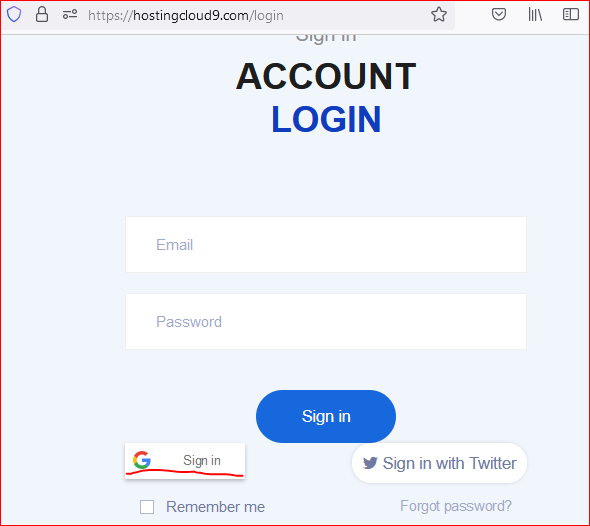
Once the login is completed any plan or a domain can be bought.
Once a plan is bought, in order to login to the control panel, use the configuration -> Hosting to create a Control Panel login.

Follow below advises to create the control panel.
- Do NOT use your email to create the user name
- Only use Lowercase
- Only use alphabets and numbers e.g. rockstar, rocky2, gold1mine etc.
- Keep the length between 6 and 30 characters
- No space(s) in the username eg.
kobra kai - Username must start with an alphabet
For password
- Keep this strong
- Minimum 6 characters, maximum 100 characters
- A combination of Uppercase, Lowercase, Numbers and some Numbers
- eg. Mah@Yu180
- Do not use easily guessable words.
Errors
| # | Error messages | Probable Resolution |
| 1. | User account xxxxx already exists | Try with a different user name |
| 2. | Validation error | There is something not being liked by the system. Please follow the above guidelines and try with a new value/text. |
| 3. | password – Your password is not complex enough. According to the server policy, the minimal password strength is Strong (recommended) | Use a Complex password as suggested above. |
| 4. | Unable to set login or password argument: Do not use quotes, space and national alphabet characters in a password. | Use a Complex password as suggested above and do not use the letters as suggested in the error message. |
| 5. | Domain already taken, please try with another domain name | The domain name that you are adding to the hosting plan is already taken by someone or you added in previous trials. Check your email for the creation of Control Panel account. Also check the details under Profile -> Control Panel. If there is one use this to login and check details. |
| 6. | The password should be between 5 to 255 characters in length, and it should not contain the username | Please do not use your username in password. |
Please add your issues in comment to find a resolution.
Happy Hosting!!!


Leave a Reply to mitolyn Cancel reply